Feature guide: Playerlist Objective
This features gives you control over Minecraft's scoreboard objective feature with PLAYER_LIST slot. On 1.20.2- it supports 2 display types:
- yellow number
- hearts
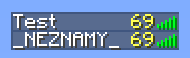

Since 1.20.3, it can display any text.

The feature can be configured in config.yml under playerlist-objective section.
This is how the default configuration looks:
playerlist-objective:
  enabled: true
  value: "%ping%"
  fancy-value: "&7Ping: %ping%"
  title: "TAB" # Only visible on Bedrock Edition
  render-type: INTEGER
  disable-condition: '%world%=disabledworld'
All of the options are explained in the following table.
| Option name | Default value | Description |
|---|---|---|
| enabled | true | Enables / Disables the feature |
| value | "%ping%" | [1.20.2-] An integer from -2147483648 to 2147483647, doesn't support decimal values. The number is always yellow. Supports placeholders with player-specific output, such as player health. Only visible on 1.20.2 and lower. Note: Even if you only support 1.20.3+, you still need to configure this value to properly evaluate to a number, because the value is still sent to the client (just not displayed). You can set it to 0 for simplicity. |
| fancy-value | "&7Ping: %ping%" | [1.20.3+] Any text, supports placeholders with per-player output. Only visible on 1.20.3+, where it completely replaces value. |
| title | "TAB" | Title to send. Only visible on Bedrock Edition. |
| render-type | INTEGER | Render type of the value. Supported values are INTEGER and HEARTS. |
| disable-condition | %world%=disabledworld | A condition (either name of a condition or a conditional expression) that must be met for disabling the feature for players. Set to empty for not disabling the feature ever. Note: Disabling the feature for a player means sending objective unregister packet to them, which results in player not seeing the feature on anyone anymore. It doesn't work the other way around - you cannot disable this feature on target players, only for viewers. |
- [1.20.2-] Only 2 display types are supported - yellow number and hearts.
- [1.20.2-] A yellow 0 will appear on all tablist entries that aren't actual players (such as NPCs and layout entries) and it cannot be removed.
TAB does not contain any sort of compatibility functionality for this feature. It will not try to prevent other plugins from applying the feature and neither will it detect it to re-add back once the other plugin removes it. Therefore, if another plugin also sends playerlist objective, TAB's may not show anymore (depending on who sends it first). Make sure you do not have any other plugin sending it to ensure the feature works properly.
You can check the list of objectives registered by either commands or plugins using Bukkit API using /scoreboard objectives list.
If it contains one that could be the cause, you can unregister it by running /scoreboard objectives remove <name>. After doing so, reload TAB, so it resends its objectives again.
Note that if this was automatically generated by a plugin, it will probably be added back again.
The feature will not be visible on players with spectator gamemode. To resolve this, check out Spectator fix feature.
This feature doesn't directly support per-world values or similar.
However, this can be achieved with conditions.
Let's make fancy-value conditional based on player's world.
Let's make an example with 3 worlds.
Check if player is in world world1, then show one text.
If not, check if player is in world world2, then show another text.
If not, show the final text.
This can be achieved by chaining 2 conditions:
conditions:
  playerlist1:
    conditions:
    - "%world%=world1"
    true: "Text to display in world world1" # Player is in world world1, display the text
    false: "%condition:playerlist2%" # Player is not in world world1, check another condition
  playerlist2:
    conditions:
    - "%world%=world2"
    true: "Text to display in world world2" # Player is in world world2, display the text
    false: "Text to display in other worlds" # Player is not in any of the 2 worlds
Warning
DO NOT JUST RANDOMLY PASTE THIS ENTIRE "CONDITIONS" SECTION INTO YOUR CONFIG! INSTEAD, EDIT YOUR EXISTING CONDITIONS SECTION TO PREVENT HAVING THE SECTION TWICE, HAVING SECOND ONE COMPLETELY OVERRIDE THE FIRST ONE!
Finally, use this condition as value in fancy-value:
playerlist-objective:
  fancy-value: "%condition:playerlist1%"
Note
This is just an example, the plugin is not limited to displaying different values only per world. If you want per server values on proxy, use %server% with server names. This works for any placeholder offered by TAB or by PlaceholderAPI.
In order to display the value as hearts, set render-type to HEARTS.
Then, set value to a placeholder that returns player's health. If you have TAB on a backend server, use %health%. If you have TAB on a proxy, use PlaceholderAPI's %player_health_rounded%.
Example configuration:
  value: "%health%"
  render-type: HEARTS
When using HEARTS render type, fancy-value is not displayed by the client, so it doesn't matter what it is set to.
Final result: