Configuration Tilt
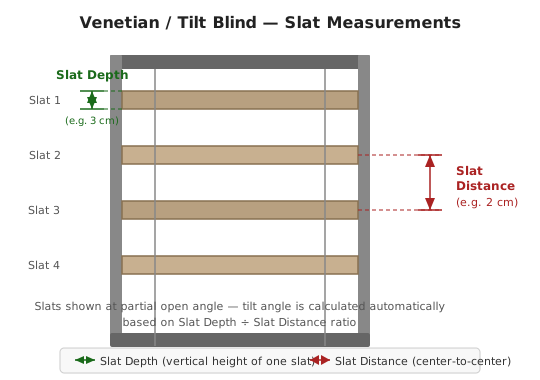
One tilt seam for every tilt-capable type. Since v2026.8.0 these settings are configured and controlled identically wherever a tilt axis exists — tilt-only covers, venetian blinds, and the louvered roof. The geometry labels are localized, and
set_tilt/set_axesreach the axis the same way on each. Where a type differs, it is called out below.
| Variables | Default | Range | Description |
|---|---|---|---|
| Slat Depth | 3 cm | 0.1–15 cm | Width of each slat, measured front to back. Shown in your Home Assistant unit system. Mini blinds ≈ 2.5 cm / 1 in, standard ≈ 5 cm / 2 in, wide slats ≈ 6.5–7.5 cm / 2.5–3 in. |
| Slat Spacing | 2 cm | 0.1–15 cm | Vertical distance between slat centres. Measure middle-of-slat to middle-of-slat. Usually slightly more than the slat depth so the slats overlap when closed. |
| Tilt Mode | Bi-directional | How the tilt percentage maps to slat angle. See Tilt modes below. | |
| Tilt Angle at 0% | 0° | 0–180 | Specify angles mode only. Raw slat angle when the cover reports 0% tilt. |
| Tilt Angle at 100% | 180° | 0–180 | Specify angles mode only. Raw slat angle when the cover reports 100% tilt. |
| Maximum Slat Tilt | 100 | 0–100 | Cap on the commanded tilt percentage. Lower it when fully-open slats reflect direct sun into the room — e.g. 70 if you get glare at peak sun angles. |
| Minimum Slat Tilt | 0 | 0–100 | Floor on the commanded tilt percentage. Raise it for blinds that go fully dark at 0% — e.g. 10 to always let some light through. |
| Apply maximum tilt only during sun tracking | Off | When off, the cap applies to every computed tilt, including the parked tilt a venetian uses when the sun is outside the acceptance angle. When on, it applies only while the sun is actively tracked. Sunset tilt and custom-position tilts are never affected either way. | |
| Apply minimum tilt only during sun tracking | Off | The same distinction for the floor. | |
| Tilt Output Transform | Clamp | How the solar tilt demand is fitted into the Minimum–Maximum band. See Clamp vs. Proportional below. | |
| Tilt Safety Margin | 0.0 | 0.0–1.0 | Closes the slats slightly further than the exact grazing angle so a sliver of direct sun doesn't leak past at extreme angles. 0.0 is a no-op. See Tilt safety margin. |
| Inverse Tilt | Off | Enable when your hardware sends tilt 0 for slats-open and 100 for slats-closed. Affects the tilt axis only — the position axis has its own Inverse State setting. Common on KNX and some Somfy wiring. |
Tilt-only and louvered-roof covers have no separate parked tilt, so the two sun tracking only toggles above make no difference on those types.
Single direction (0% = closed / 100% = open) — the slats rotate one way only, through roughly 90°.
Bi-directional (0% = closed / 50% = open / 100% = closed) — the default. The slats pass through horizontal at 50% and close again in the other direction, covering roughly 180°.
Specify angles — added in v2026.8.0. For calibrated slats whose travel matches neither preset. Set the raw slat angle at 0% and at 100% tilt directly, and the integration interpolates between them. Angles are absolute: 0° = closed downward, 90° = horizontal, 180° = closed upward.
Reach for Specify angles when the presets misreport where horizontal actually falls — a blind whose slats run from 20° to 160° rather than a clean 0–180 will sit noticeably off the grazing angle under either preset, because both assume the endpoints. Entering the real endpoints fixes the mapping for the whole range at once.
Added in v2026.8.0. Narrowing the Minimum/Maximum Slat Tilt band raises the question of what to do with a solar demand that falls outside it, and the Tilt Output Transform setting answers it two ways.
Clamp (the default, and the pre-2026.8 behaviour) flat-caps the value at the band edge. Every demand above the maximum lands on the maximum, so the slats stop responding to the sun once the cap is reached.
Proportional linearly rescales the full 0–100% solar demand into the band instead, so the slats keep tracking the sun across the whole range, just over a smaller arc.
With Minimum 0% and Maximum 40%, a calculated 50% becomes 20% under Proportional and 40% under Clamp. The practical difference shows up across an afternoon: under Clamp a blind capped at 40% sits at exactly 40% for hours and then starts moving again; under Proportional it moves continuously the whole time.
Proportional needs Maximum Slat Tilt to be greater than Minimum Slat Tilt. With the two equal there is no band to scale into, and the setting has nothing to do.

🏠 Home · ✨ Features · 📰 What's New
🚀 Getting Started
- Installation
- Migrating from Custom Repository
- Migrating from Adaptive Cover
- First-Time Setup
- Building Profile ← start here if you have multiple covers
- Cover Groups
- Copy Settings to Other Covers
- Cover Types
🧠 Core Concepts
📐 Cover Types
- Vertical
- Horizontal
- Oscillating Awning
- Roof / Skylight Window
- Tilt
- Louvered Roof
- Sliding Curtain
- Day/Night Shade
- Dual Panel
- Venetian (Dual-Axis)
⚙️ Configuration
- Sun Tracking
- Position
- Position Matching
- Travel Time Calibration
- Glare Zones
- Automation
- Command Queue
- Custom Position
- Force Override
- Weather Safety
- Climate
- Templated Thresholds
- Template Self-References
- Blindspot
- Summary Screen
- Debug & Diagnostics
🔌 Entities & Services
- Entities
- Proxy Cover Entity
- Position Verification
- My Position Support (Somfy RTS)
- Runtime Configuration Services
🛠️ Operations
- Known Limitations
- Hardware Compatibility
- Troubleshooting
- Troubleshooting Findings
- Diagnostic Sensors
- Tips and Tricks
🔧 Advanced Use Cases
- Overview
- Dynamic Temperature Thresholds
- Dynamic Tracking Window
- Bedroom Sleep Mode
- Handling Variable Cloud Cover
- Indoor Lux Sensor Behind the Cover
- Venetian Tilt-Only on Overcast Days
- Forecast-Based Shading
- Custom Position When Sun in FOV
- Suppress Closing While a Door Is Open
- Keep a Blind Clear of the Sill
🎨 Dashboard
- Dashboard Cards
- Panel Card
- Tile Card
- Sky Compass Card
- Decision Strip Card
- Solar Chart Card
- History Card
🧪 Testing & Simulation
📚 Reference
👩💻 For Developers